
MailerLite Free Plan Review: What You Actually Get
Tested on the free plan · November 2026
We opened a fresh MailerLite account, built a signup form, imported a small test list, wrote an email, sent it to ourselves, and started a welcome automation. Short answer: yes, a small business can run a simple newsletter on MailerLite for free. But the account starts with a trial of the paid features, so what you see on day one is more than you'll keep.
Our verdict
Good fit for: a small business or side project that wants a clean signup form and a regular newsletter, and doesn't mind a "Sent by MailerLite" badge in the footer.
You'll outgrow it when: you want more than a few simple automations, your own branding with no MailerLite badge, or the list grows past the free cap.
What we built
We signed up with the brand's Gmail address and went through MailerLite's four-step setup. It asks how many subscribers you have, your industry, a physical mailing address (you can't skip this one), and what you want to do first. Then it makes you confirm your email before the dashboard opens. After that we made an embedded signup form and imported three test contacts from a CSV file. Then we designed an email from a template, sent a test to our own inbox, and opened the automation builder to set up a welcome email. Every step below comes from our test notes and screenshots.
The first thing to know: you start on a trial
When the dashboard opened, the sidebar said "Trial" and there was an Upgrade button at the top. MailerLite didn't ask for a card. That's good. But it means the first stretch of your account shows paid features you won't keep.
We also clicked the trial badge. The plan picker inside the app only listed paid plans. The free plan wasn't offered there at all. It is on MailerLite's public pricing page, and that page says what happens when the trial ends. So if you want to know what's truly free, use the pricing page, not the in-app picker.
What's included free
| Feature | Free plan | Notes from our test |
|---|---|---|
| Embedded signup form | Included free | Ready-made "Newsletter" form, hosted share link, double opt-in on by default |
| Form spam protection | Included free | reCAPTCHA checkbox is switched on by default |
| CSV import | Included free | Auto-matched our columns, but flagged Gmail "+" addresses (see below) |
| Regular campaigns | Included free | No badge on Regular or A/B split campaigns |
| RSS, auto resend and multivariate campaigns | Paid only | Each carries a "Premium" badge |
| Simple welcome automation | Included free | No badge, but the template needs editing before it will switch on |
| Multi-trigger automations | Paid only | Advanced welcome, webinar and demo-call templates are marked "Premium" |
| Removing the "Sent by MailerLite" badge | Paid only | The badge showed in every email footer we made |
| Landing page / website builder | Not tested | On our list for the re-test |
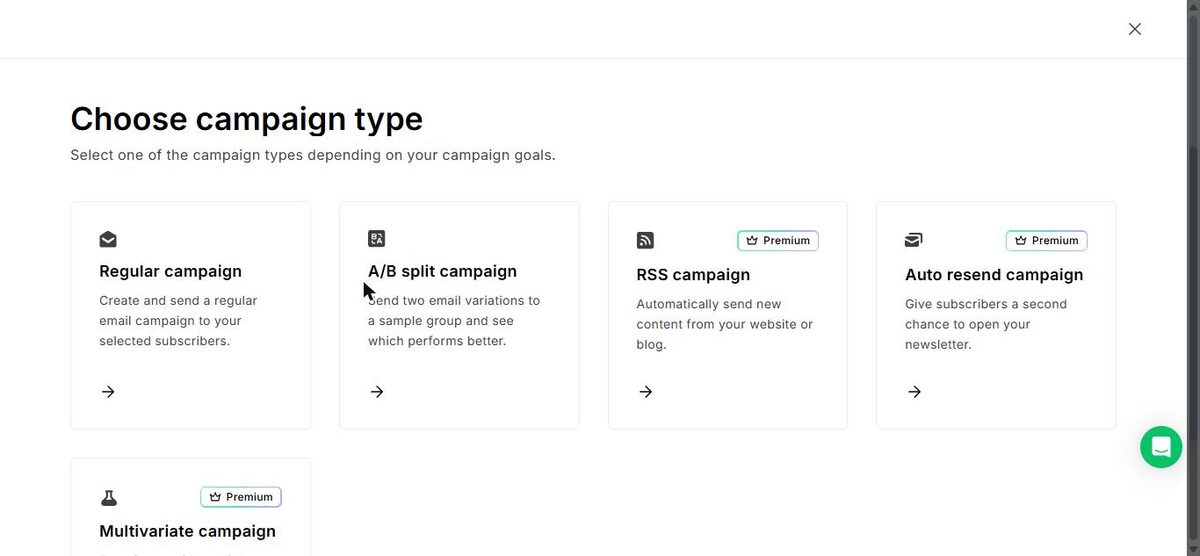
One thing we liked: MailerLite marks paid features with a "Premium" badge even while the trial is running. That makes it much easier to tell what you'll lose.
The signup form
Forms come in three types: pop-up, embedded and promotion. The embedded form took three short steps, and it made us pick or create a subscriber group first. The editor opened with a ready-made form: a heading, an email field, a reCAPTCHA checkbox and a Subscribe button. We saw no MailerLite badge on the form itself.
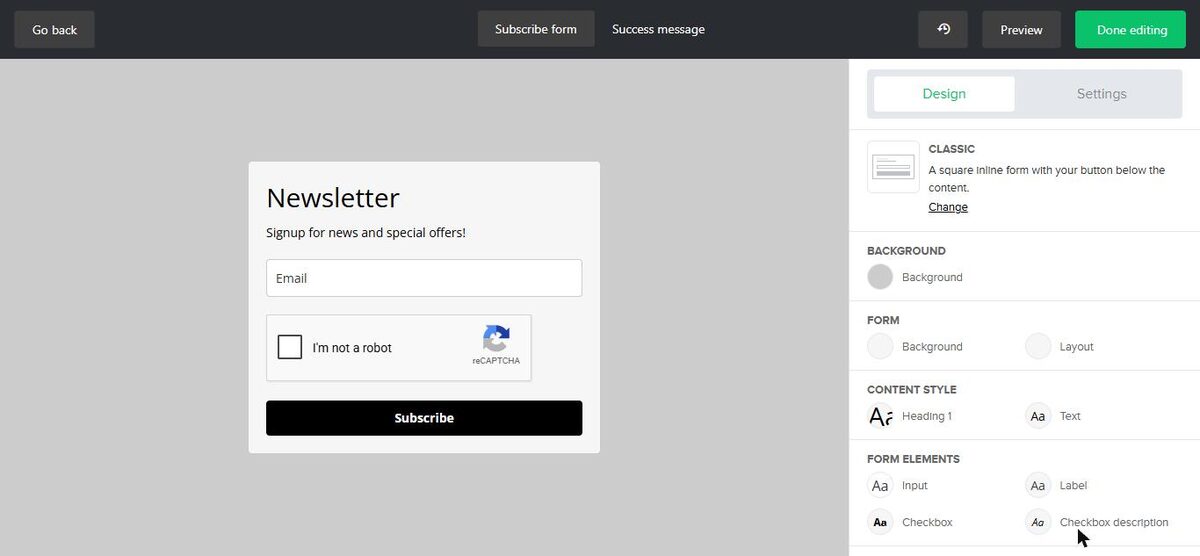
When we finished, the form had double opt-in on by default and a hosted share link. That means the form works even if you don't have a website yet.
Where the paywall hits
The badge. Every email we built had a green "Sent by MailerLite" badge in the footer. MailerLite filled in the rest of the footer for us, including our logo, brand name, mailing address and an unsubscribe link. Removing the badge is a paid feature.
Automations. The free plan has automations, with limits on how many you can run and how many steps each can have. Check MailerLite's pricing page for the current numbers. Templates that use more than one trigger are marked Premium. During the trial we could add a second trigger, so expect that option to go away when the trial ends.
Campaign types. RSS campaigns (automatic emails from your blog), auto resend and multivariate tests are all marked Premium.
List size and sends. The free plan caps both your subscribers and your monthly emails. We won't print the numbers here because MailerLite can change them. The current limits are on MailerLite's pricing page.
Three surprises a beginner should know about
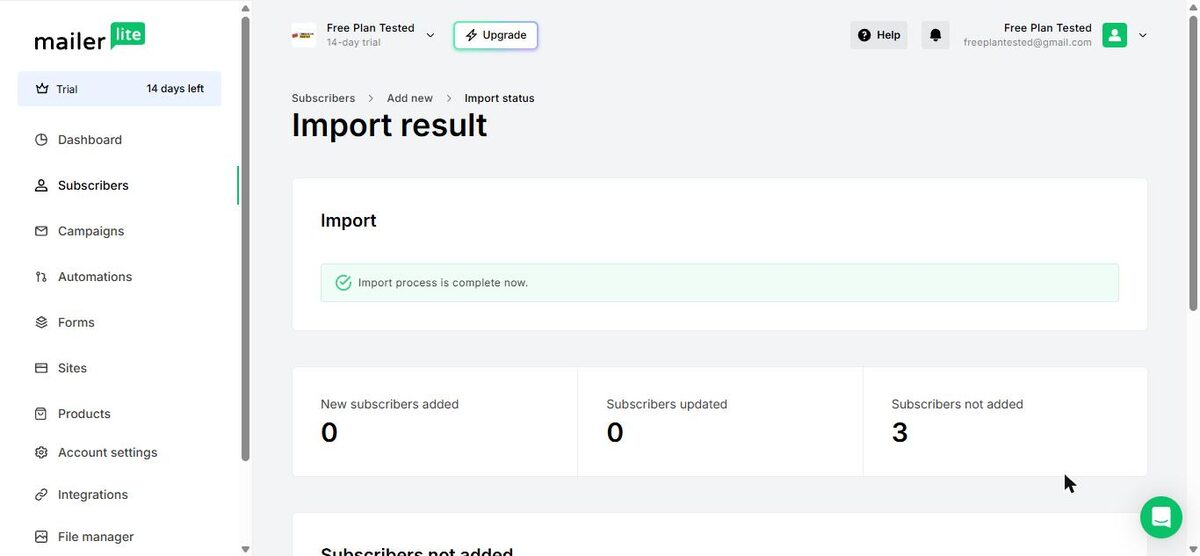
1. Gmail "+" addresses got rejected. All three of our test contacts used Gmail plus addresses (like [email protected]). The import flagged every one as "suspicious format" and added none. The fix was easy: select the flagged rows and choose "Import all". But a beginner could easily think the import just failed.
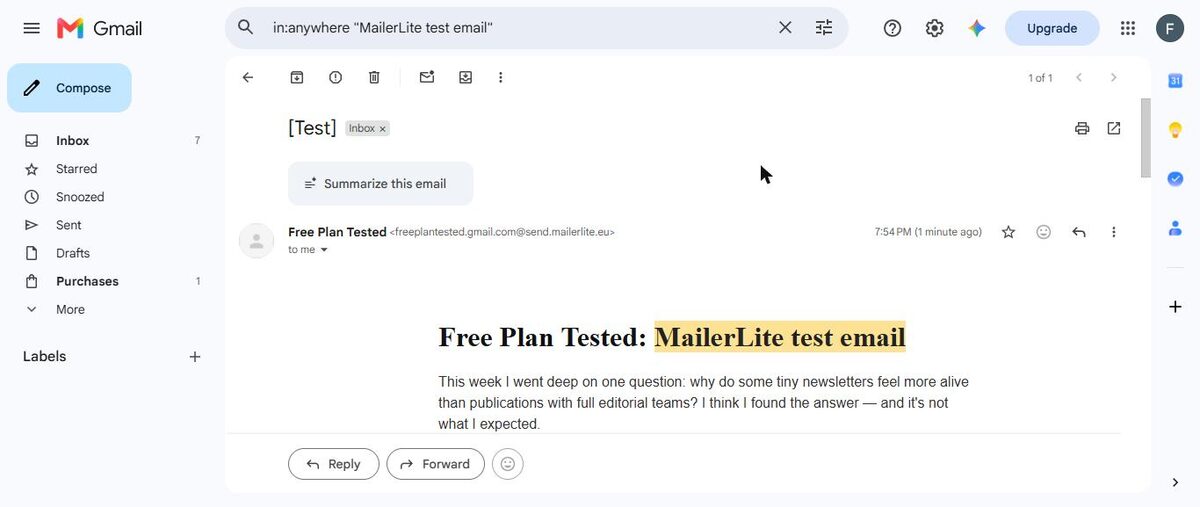
2. Your Gmail address won't be the sender. Our test email arrived in Gmail's main inbox within about a minute. That's good. But the sender showed as our Gmail name at MailerLite's sending domain, not our real address. To send as yourself, you need your own domain. That's the "Connect your domain" step on the dashboard.
3. The starter welcome email won't switch on as it comes. The "Simple welcome email" template has no Premium badge. But when we clicked Activate, MailerLite said steps were incomplete. The template ships without an unsubscribe link and with placeholder buttons. You have to add both before it will send. It's a small job, but it isn't explained up front.
What we liked
- No card needed to start, and no checkout pop-up
- Paid features carry a clear "Premium" badge, even during the trial
- Double opt-in and reCAPTCHA are on by default, which protects list quality
- The test email landed in the main inbox, not spam or Promotions
- The footer filled itself in with our logo, address and unsubscribe link
What held us back
- The in-app plan picker hides the free plan
- A mailing address is required before you can use the account
- Gmail "+" addresses were flagged on import
- "Sent by MailerLite" badge in every email
- The starter welcome automation needs fixing before it will activate
MailerLite free plan vs. the closest alternative
The tool people most often weigh against MailerLite is Kit. We ran the same steps on both. Kit gives creators polished landing pages, but its free plan leaves out automated email sequences entirely. Read our MailerLite vs Kit comparison and our Kit free plan review.
Should you upgrade?
Stay on free if you're sending a regular newsletter to a small list, one simple welcome email is enough, and the badge doesn't bother you.
Think about upgrading if you need several automations, triggers based on more than one action, RSS emails from your blog, or a footer without MailerLite's badge.
Before you decide, check two things. First, read MailerLite's pricing page for the current free limits. Second, notice which features carry a Premium badge during your trial. Those are the ones that will go away. Current prices are on MailerLite's pricing page.
Ready to try MailerLite? A small business or side project that wants a clean signup form and a regular newsletter.
Try MailerLite free