
EmailOctopus Free Plan Review: Smooth Setup, but Spam
Tested on the free plan · November 2026
We signed up for EmailOctopus with a Google login, set up our brand, and sent a test campaign to a Gmail inbox. Short answer: setup was the smoothest of any tool we've tested. EmailOctopus pulled our logo from our website and built branded templates for us. But our test email landed in Gmail's spam folder, and it carried a "Powered by EmailOctopus" badge.
Our verdict
Good fit for: beginners who want a simple, friendly editor and a quick, guided setup.
Not a fit for: anyone who needs a first email to reach the inbox without warming up their list, or who wants no tool branding in their emails.
What we built
We finished EmailOctopus's setup, picked the free plan, added a test reader, and sent one campaign from a branded template. Every point below comes from our test notes and screenshots.
Setup: the best we've seen
Before you can send, EmailOctopus asks for a mailing address for your email footer. You can tick "Keep this private in my emails" and it will show its own address instead. A live preview shows your footer as you type.
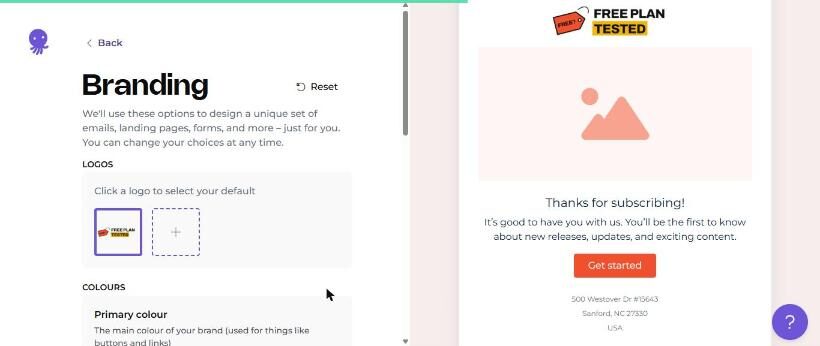
Then it does something clever. It read our website, pulled in our logo and colours, and showed us a branded welcome email right away.
Sending from a Gmail address
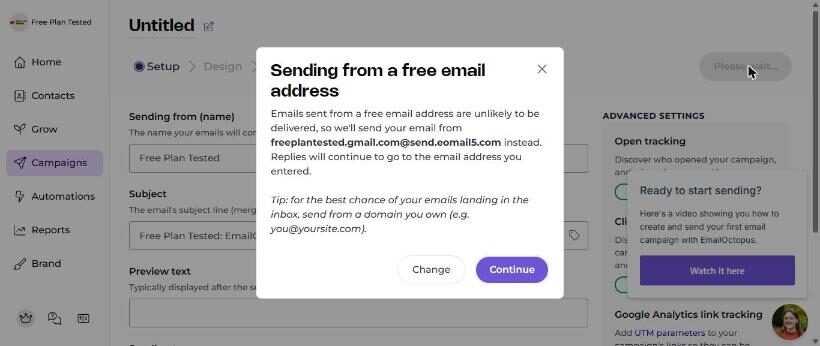
When we entered our Gmail address as the sender, EmailOctopus explained that free addresses are unlikely to be delivered. It offered to send from its own domain instead, with replies still going to our Gmail. That's the same fix that helped other tools reach our inbox.
A human checks your first campaign
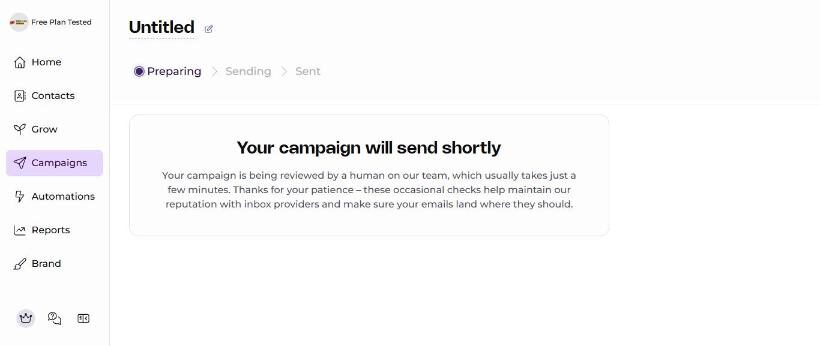
After we hit send, EmailOctopus said a person on its team would review the campaign first. Two emails from its staff followed: one saying the review had started, and one saying it was done and the campaign was on its way. It took a while because we sent late at night. Expect a short wait on your first send.
Where it landed: spam
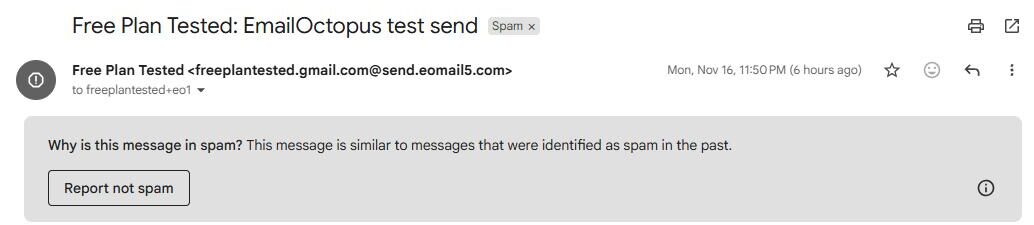
Our test landed in Gmail's spam folder. Gmail said the message was similar to messages identified as spam in the past. This surprised us: tools that send from their own domain, like Buttondown and Brevo, reached our inbox.
To be fair, we sent one of EmailOctopus's stock templates with its sample text, from a brand-new account. Real content and a warmed-up list may do better. One test is one data point. But it's the result we got.
What's included free
| Feature | Free plan | Notes |
|---|---|---|
| Drag-and-drop editor and templates | Included free | Tested: branded templates built from our website |
| Sending from a Gmail address | Included free | Tested: sent from EmailOctopus's domain instead |
| Inbox placement | Spam in our test | Tested: one send, landed in Gmail spam |
| Removing EmailOctopus branding | Paid only | Tested: "Powered by EmailOctopus" in the footer |
| Forms and landing pages | Not tested | Free plan screen lists a small number |
| Automations | Not tested | We didn't test them |
The plan screen also says free reports are kept for a limited time and the free plan limits users. Current limits are on EmailOctopus's pricing page.
Setup notes
- EmailOctopus used the name from our Google profile as the account name. Change it if you want your business name instead.
- The address you enter appears in every email footer unless you tick "Keep this private."
- Plan your first send for business hours, since a person reviews it.
What we liked
- Pulled our logo and colours from our website on its own
- Clear, honest warning about Gmail senders, with a fix
- An option to keep your mailing address private
What held us back
- Our test landed in Gmail's spam folder
- "Powered by EmailOctopus" badge on free emails
- The first campaign waits for a human review
EmailOctopus free plan vs. the alternatives
If inbox placement matters most, Buttondown, Brevo and Benchmark all reached our inbox. If you like EmailOctopus's simple style, MailerLite is a similar beginner-friendly tool that also reached our inbox.
Should you upgrade?
Upgrade if you want the EmailOctopus badge gone, longer reports, or more users. Upgrading won't fix spam placement on its own. Sending from your own domain is the bigger fix. Current prices are on EmailOctopus's pricing page.
Ready to try EmailOctopus? Beginners who want a simple editor and a guided setup.
Try EmailOctopus free