
GetResponse Free Plan Review: The Trial, the Badge and the Spam Folder
Tested on the free plan · November 2026
We signed up for GetResponse with a Google account and finished its setup. Then we built a newsletter, sent it to our own list, and checked where it landed. Short answer: GetResponse gives you a lot to try at first, because every new account starts with a trial of its premium features. Underneath is a smaller free plan with a GetResponse badge on every email. And our test newsletter went straight to spam.
Our verdict
Good fit for: someone who wants to send simple newsletters for free and already has, or will set up, their own email domain.
You'll outgrow it when: you want the GetResponse badge off your emails, or you need the automations you tried during the trial.
What we built
We signed up with Google and went through setup: company name, country, business type and a mailing address. Then we created a newsletter, wrote it in the HTML editor, and sent it to our list. The only contact on that list was our own address, which GetResponse added for us. Every point below comes from our test notes and screenshots.
The first thing to know: you start in a trial
New GetResponse accounts start with a free trial of premium features. A banner across the top counts down the days and asks you to upgrade. During the trial, the Tools menu shows no "paid" labels, so you can't easily tell which features you'll lose when it ends.
GetResponse's pricing page explains what happens next: you keep the free plan, but premium features switch off. So if you're testing GetResponse, judge it on the basics. Don't build your setup around an automation you may lose when the trial ends.
What's included free
| Feature | Free plan | Notes from our test |
|---|---|---|
| Newsletters | Included free | Built and sent one; the send screen said "Your current plan: Free" |
| Templates and editors | Included free | Ready-made templates, a drag-and-drop editor and an HTML editor |
| AI email writer | Limited | Offered a small number of free runs |
| "Perfect timing" sending | Paid only | Shown with a lock on the send screen |
| Removing GetResponse branding | Paid only | The badge was added to our email's footer |
| Sign-up forms, landing pages | Not tested | On our list for the re-test |
Setup asks for an address
Like most email tools, GetResponse needs a real mailing address for your email footer. It shows you a preview of the footer as you type. Have a business address or a mailbox service ready.
One more small thing: the "From" name on our newsletter was filled in from our Google profile's first name, not our company name. Check it before you send.
GetResponse warns you about Gmail
When we picked our Gmail address as the sender, GetResponse showed a warning. It said to switch to an address on our own domain and set up DKIM, an email security record, to meet Google's sender rules. It also offered to sell us a domain.
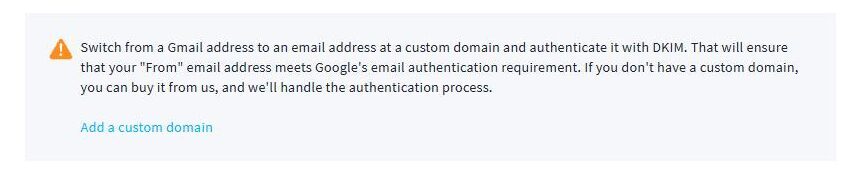
After we sent, a second notice showed up in the account. It said our Gmail address wasn't authenticated, and that this affects delivery and inbox placement.
Where our newsletter landed
Our test newsletter arrived within a couple of minutes, in Gmail's spam folder. It came from our Gmail address "via getresponse-mail.com". Gmail said the message was similar to ones flagged as spam before.
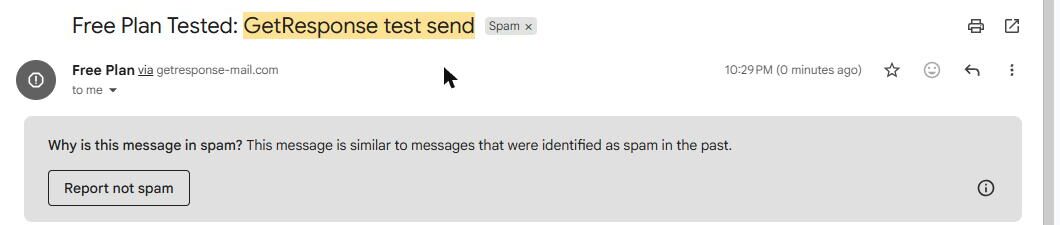
One test isn't proof, and inbox results vary. But GetResponse warned us twice. If you use it, set up your own domain before you send to real readers.
Update: from our own domain, it reached the inbox
We later re-sent the same newsletter from an address on our own domain, with GetResponse's DKIM record added. It landed in Gmail's inbox, with no "via" tag and Gmail's own unsubscribe link. Details in our own-domain retest.
The badge on every email
GetResponse added a footer to our email with our address, unsubscribe links and a "Powered by GetResponse" badge. That happened even though we wrote our own HTML. GetResponse's pricing page says free accounts get this badge on every message, and only paid plans can remove it.

Also note the footer language. Our account was set to English, but the footer came out in Spanish, likely because we tested from Mexico. Send yourself a test and check your footer before your first real send.
Where the paywall hits
Branding. The GetResponse badge stays on every email until you pay.
Trial features. Premium features are open at first, then switch off. Nothing in the menu tells you which ones.
List size and sends. The free plan caps your contacts and your monthly sends. GetResponse shows both in the app. Check its pricing page for the current limits.
What we liked
- A real free plan that stays after the trial
- Lots of templates, plus drag-and-drop and HTML editors
- Clear warnings about sending from a Gmail address
- The send screen shows how much of your monthly limit is left
What held us back
- The trial blurs what's actually free
- A GetResponse badge on every free email
- Our test newsletter from a Gmail address landed in spam
- The footer came out in the wrong language for our account
GetResponse free plan vs. the alternatives
AWeber and GetResponse both put their branding on free emails, and both sent our Gmail-address tests to spam. MailerLite's test email reached our inbox. For newsletter writers, beehiiv's free plan is built around publishing, and its welcome email works on free.
Should you upgrade?
Stay on free if you send simple newsletters to a small list and don't mind the badge.
Think about upgrading if you want the badge gone or you came to rely on a trial feature. Either way, set up your own sending domain first. Current prices are on GetResponse's pricing page.
Ready to try GetResponse? Someone sending simple newsletters who has, or will set up, their own email domain.
Try GetResponse free