
AWeber Free Plan Review: What You Get, and Where to Click
Tested on the free plan · November 2026
We signed up for AWeber's free plan with a Google account and finished its setup questions. Then we published its ready-made sign-up page, switched on a welcome email, and joined our own list as a test reader. Short answer: AWeber's free plan includes a hosted sign-up page and an automatic welcome email. But finding the free plan takes a careful click, and both of our test emails landed in spam.
Our verdict
Good fit for: a small business that wants a sign-up page and a working welcome email for free, and plans to send from its own domain.
You'll outgrow it when: your list passes the free cap, or you want AWeber's branding off your pages and emails.
What we built
We used "Continue with Google" on AWeber's free-plan page. Setup asked for our business name, website, industry, a mailing address (required "because of anti-spam laws"), our list size and our goals. Then we published the sign-up page AWeber had made for us, switched on its welcome series, and signed up a test address. Every point below comes from our test notes and screenshots.
The first thing to know: look for the small link
After setup, AWeber showed a full page selling a free trial of its paid plans. The way to stay on the free plan was a small text link at the very bottom: "continue with Free". If you click the big trial buttons instead, you're starting a paid-plan trial. Scroll down and use the link if you just want the free plan.
Once we did, the dashboard said "Welcome to AWeber" and showed a short getting-started list. There were also ads for an upgrade and for a paid setup service.
What's included free
| Feature | Free plan | Notes from our test |
|---|---|---|
| Hosted sign-up page | Included free | Ready-made page on a free aweb.page address |
| Double opt-in | Included free | On by default; new readers must confirm |
| Welcome email workflow | Included free | "Publish and Turn On" worked with no paywall |
| Visual workflow builder | Included free | Starter, tag and send-message steps |
| Removing AWeber branding | Paid only | AWeber's pricing page lists it on Plus only |
| Newsletters, templates, custom domain | Not tested | On our list for the re-test |
The sign-up page
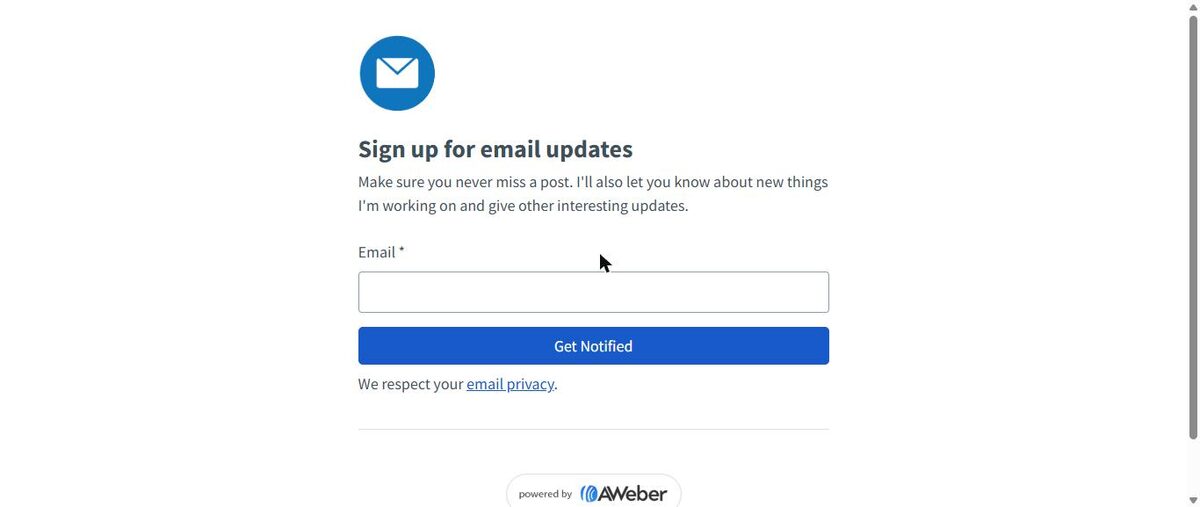
AWeber made a sign-up page for us during setup. Publishing it took one click and gave it a free address on aweb.page. But the page was generic: an envelope icon, a "Sign up for email updates" heading, filler text written as "I", and a "powered by AWeber" badge. Our name and logo weren't on it. Plan to edit it before you share it.
The welcome email works on free
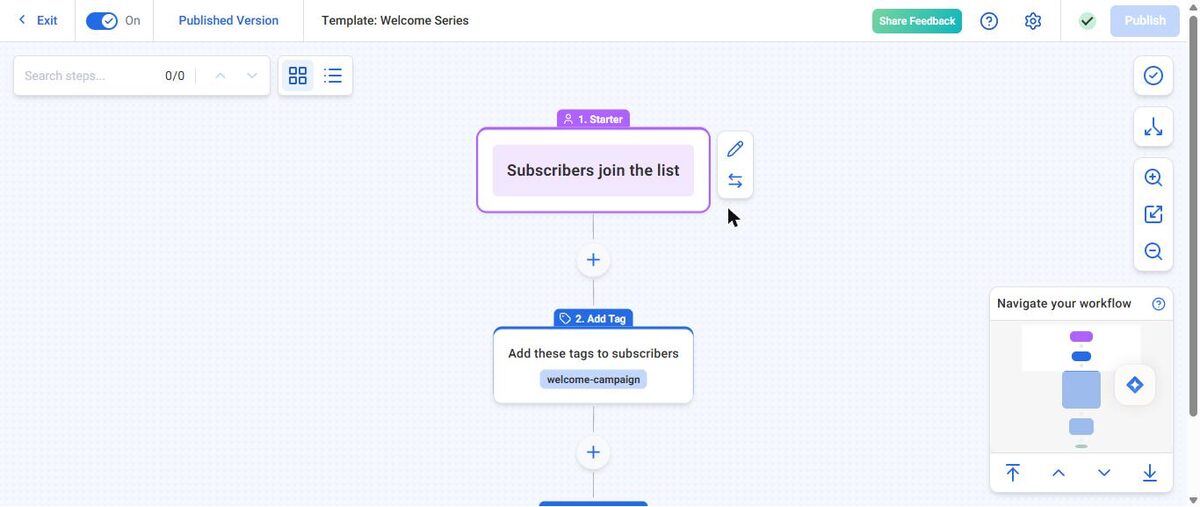
The "welcome your new subscribers" step opened a ready-made workflow: when someone joins, tag them, then send a "Thanks for signing up!" email. When we clicked Publish, AWeber warned that we should set up our own business domain for better delivery. Then "Publish and Turn On" worked, with no upgrade needed.
That's a real strength. On Kit's free plan, automated emails are paid. beehiiv's free plan also gives you a welcome email, but not multi-step automations.
Where our emails landed
We signed up a test address on the hosted page. AWeber showed an "Activate your subscription" page, because double opt-in is on by default. That's good for list quality.
Then came the surprise. The confirmation email landed in Gmail's spam folder. It was sent from our Gmail address "via aweber.com". After we confirmed, the welcome email arrived right away, and it went to spam too.
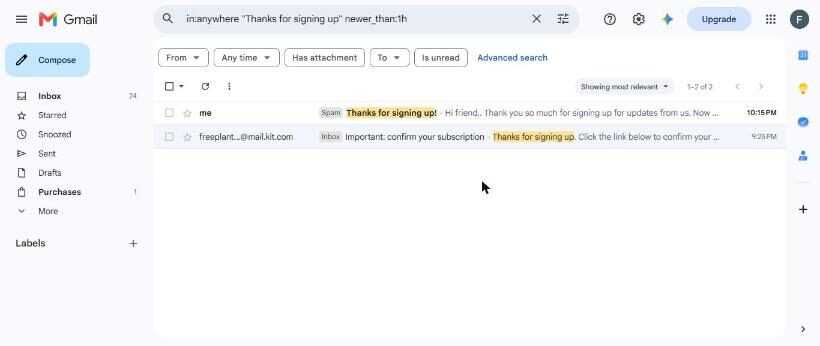
One test isn't proof, and inbox results vary. But AWeber warned us about this itself when we published. If you use AWeber, connect your own domain before sending to real readers. Readers who never find the confirmation email never join your list.
Update: from our own domain, it reached the inbox
We later added an address on our own domain, with AWeber's DKIM records set up, and sent a test message from the same list. It landed in Gmail's inbox with no "via" tag. That was a test message, not the confirmation email, so it's a good sign rather than a like-for-like rerun. Details in our own-domain retest.
Where the paywall hits
Branding. The hosted page carries a "powered by AWeber" badge. AWeber's pricing page lists removing its branding on the Plus plan, not the cheaper Lite plan.
List size and sends. The free plan caps your subscribers and your monthly emails. Check AWeber's free-plan page for the current limits.
Other things to know
- AWeber asks for a physical mailing address during setup. Have a business address ready.
- It added the account owner's own email to the list when the page went live, and it emails you about every new subscriber.
- The confirmation email shows the address you entered during setup at the bottom.
What we liked
- A ready-made sign-up page on a free hosted address
- A welcome email workflow that runs on the free plan
- Double opt-in on by default
- A clear warning about sending from your own domain
- No card needed to stay on free
What held us back
- The free plan hides behind a small link on a big upgrade page
- The ready-made page is generic and needs editing
- Both test emails from our Gmail address landed in spam
- Branding removal is only on the top paid plan
AWeber free plan vs. the alternatives
Like MailerLite, AWeber gives you a working automatic welcome email for free. MailerLite's test email reached our inbox. AWeber's didn't, though both rewrite or relay a Gmail sender. For creators, see our MailerLite vs Kit comparison.
Should you upgrade?
Stay on free if your list is small and one welcome email plus regular newsletters covers what you need.
Think about upgrading if you want AWeber's branding gone or your list is growing past the free cap. Either way, set up your own sending domain first. Current prices are on AWeber's pricing page.
Ready to try AWeber? A small business that wants a free signup page and welcome email, and has its own domain.
Try AWeber free