
Sender Free Plan Review: Generous on Paper, but No Gmail Senders
Tested on the free plan · November 2026
We set up a Sender account with a Google login, finished its setup, imported a test reader, and started our first campaign. Short answer: Sender's free plan promises a lot, including automations and landing pages. But it won't let you send from a Gmail address. If you don't have an email address on your own domain yet, you can't send anything.
Our verdict
Good fit for: a small business that already has an email address on its own domain and wants a free plan with automations included.
Not a fit for: anyone starting out with only a Gmail, Outlook or other free address. You'll need a domain and a business email first.
What we built
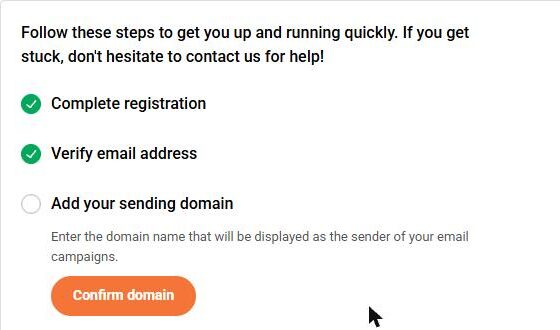
We finished Sender's registration: a mailing address, time zone, and questions about our business and role. Then we imported one test subscriber and started an email campaign. That's as far as we could get. Every point below comes from our test notes and screenshots.
The wall: Gmail senders aren't allowed
On the campaign settings page, we entered our Gmail address as the sender. Sender showed an error right away: Gmail addresses aren't allowed because of DMARC rules.
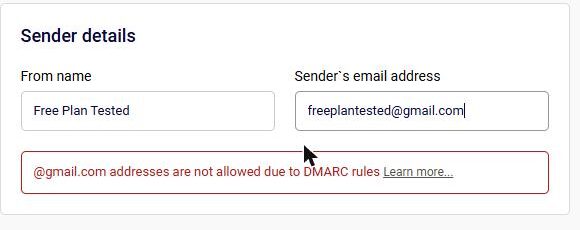
Sender's help pages explain why. When a tool sends mail "as" a Gmail address, inbox providers can't confirm it really came from Gmail, so the mail often lands in spam or bounces. Our tests back this up: AWeber and GetResponse both sent our Gmail-address tests to spam. Sender simply refuses to try. Its help page says a business email address is required and points you to a paid email service if you don't have one.
That's an honest rule, and it protects your sending reputation. But it means "free" isn't quite free if you don't own a domain yet.
Update: with our own domain, it sent and reached the inbox
We later verified our own domain in Sender. The setup was a confirmation email to an address on the domain, one DKIM record, one addition to our SPF record and a DMARC record. Our first test email then reached Gmail's inbox within a minute. Details in our own-domain retest.
What's included free (by Sender's own pricing page)
Because we couldn't send, we couldn't test most features. Here's what Sender's pricing page lists for the free plan, marked so you know what we saw ourselves.
| Feature | Free plan | Notes |
|---|---|---|
| Importing subscribers | Included free | Tested: copy-and-paste import worked in three steps |
| Sending from a Gmail address | Not allowed | Tested: blocked on every plan; you need your own domain |
| Newsletters and automations | Not tested | Sender's pricing page lists them on free |
| Forms, popups, landing pages | Not tested | Listed on free, with limits |
| Removing Sender branding | Paid only | Pricing page says branding is required on free |
| A/B tests, SMS, auto resend | Paid only | Listed on paid plans |
Setup notes
- Sender asks for a mailing address for anti-spam laws, plus your time zone. A phone number is optional.
- It used the name from our Google profile as the account name. If you want your business name instead, change it under Settings, then Users.
- When you import contacts, you confirm that everyone agreed to hear from you.
What we liked
- Clear, fast import of subscribers
- A clear error and help page explaining the Gmail block
- The free plan lists automations, which many free plans charge for
What held us back
- No sending at all from a Gmail or other free address
- Using it for free really means owning a domain and business email first
- Sender branding on free emails, forms and pages
Sender free plan vs. the alternatives
If you only have a Gmail address today, start somewhere that gives you a sending address on its own domain. Buttondown did that, and both of its test emails reached our inbox. MailerLite rewrote our Gmail sender and its test also reached the inbox. Come back to Sender once you have your own domain.
Should you upgrade?
Upgrading doesn't remove the domain rule; every plan needs your own sending domain. Upgrade only if you want Sender's branding gone or need paid features like A/B tests or SMS. Current prices are on Sender's pricing page.
Ready to try Sender? A small business that already has an email address on its own domain.
Try Sender free